
GPT Quant Strategy Performance
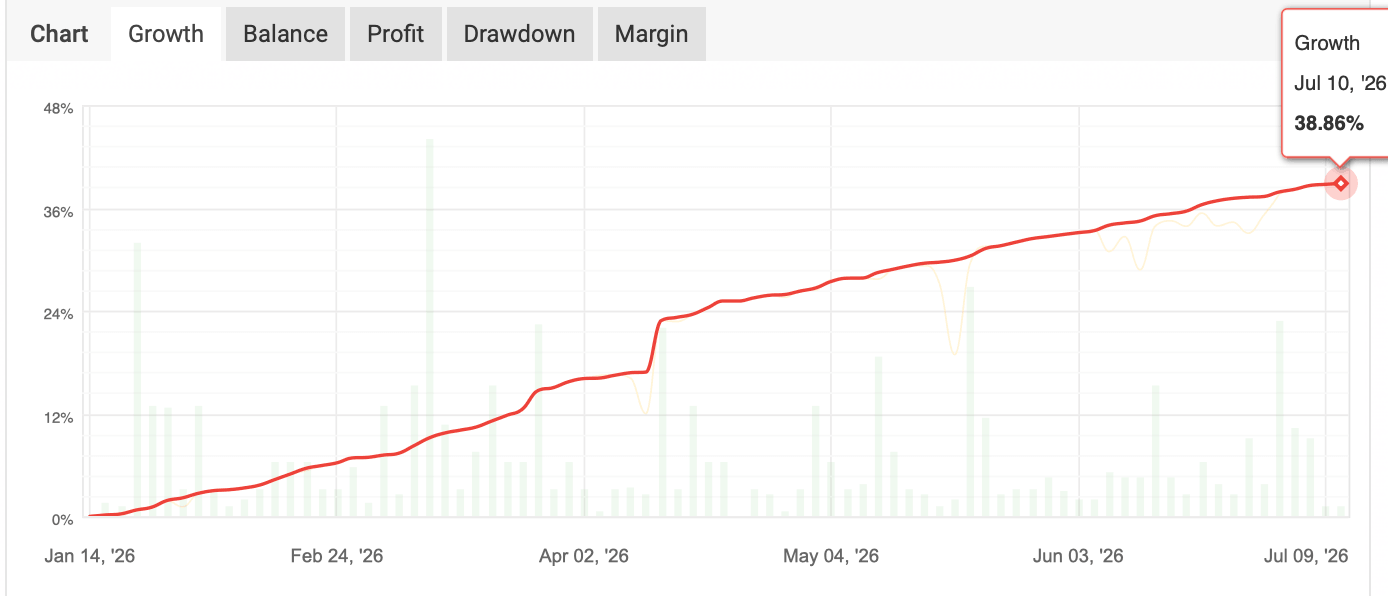
The strategy's performance is fully transparent and independently verified through Myfxbook. All trading results are updated automatically in real time.
Live performance from a real trading account - not backtests or simulations.
Conservative Risk Profile
Track Record: 26 Weeks (6 Months)
Total Return:
+38.86% (~50-75% annualized)
Average Monthly Return:
+5.0-7.0%
Average Weekly Return:
+1.0-1.4%
Maximum Drawdown:
18.33%
Balanced Risk Profile
Track Record: 26 Weeks (6 Months)
Total Return:
+58.29% (~75-95% annualized)
Average Monthly Return:
+7.0-9.0%
Average Weekly Return:
+1.5-2.1%
Maximum Drawdown:
27.49%
Total Closed Trades: 721
Winning Trades: 500
Losing Trades: 221
Overall Win Rate: 70%
Verified & Tracked by Myfxbook
→ View Full Live Performance
Live Copy Traders Results
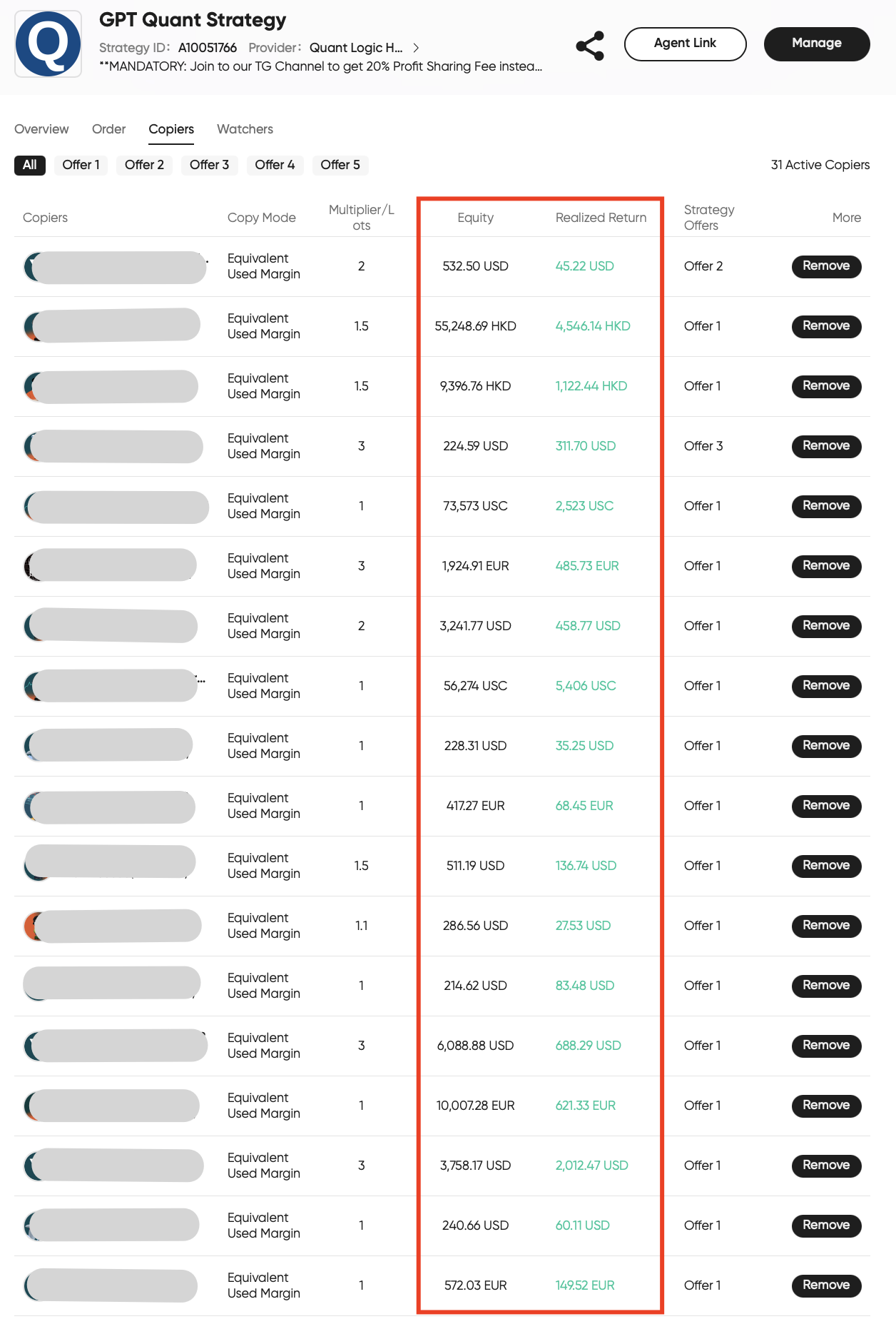
The screenshot below shows real Copy Traders trading accounts, including their current account equity and realized returns.
Active Copy Traders (Copiers):
38
Total Connected Capital:
€50,000+
Smallest Connected Capital:
€100
Largest Connected Capital:
€10,000+
All accounts shown are real Copy Traders trading accounts connected to GPT Quant Strategy. Individual results may vary depending on the selected risk profile, investment amount, and connection date.
Step 1. Open a Trading Account
To connect to GPT Quant Strategy, you'll need a trading account with one of our supported brokers.
If you already have a compatible trading account, you can use it without opening a new one.
Your funds always remain in your own brokerage account under your full control.
Step 2. Connect to GPT Quant Strategy
Connect your trading account to GPT Quant Strategy in just a few clicks.
No additional software or complicated setup is required. The entire connection is handled through the broker's copy trading infrastructure.
Step 3. Start Copying Trades Automatically
Once connected, every trade executed by GPT Quant Strategy is automatically copied to your trading account in real time.
You can monitor your account, open positions, trading history, and performance at any time directly from your broker's dashboard.
Your Capital Always Remains Under Your Control
• You never transfer money to us
• You always keep full control of your funds
• Your capital remains in your own brokerage account
• You can disconnect from the strategy or withdraw your funds at any time
• We trade our own capital using the same strategy
• Trades from our live trading account are automatically copied to yours
• The strategy follows predefined algorithms and strict risk management rules
• GPT Quant Strategy is available exclusively through automated copy trading and is not sold as standalone software
Ready to Learn More About the Strategy?
Explore live trading results, daily performance updates, and verified statistics in our Official Telegram Channel
Ready to Start Copying the Strategy?
Contact the GPT Quant Strategy team to receive step-by-step instructions on how to connect your trading account and start automatically copying the strategy
Frequently Asked Questions
Find answers to the most common questions about our services and solutions.
Your funds always remain in your own brokerage account. We never accept deposits or have access to withdraw your money.
GPT Quant Strategy is a systematic trading strategy that automatically opens and closes trades on your trading account according to predefined trading and risk management rules.
No. The strategy is fully automated and does not require any trading experience or market analysis on your part.
Yes. You remain in full control of your trading account and can disconnect from the strategy or withdraw your funds whenever you want.
The minimum capital required to start copying the strategy is €100. This amount allows you to experience how automated copy trading works and determine whether the strategy is right for you. For more effective capital management and to better benefit from the strategy's long-term potential, we recommend an capital of €1,000+.
Investment returns depend on market conditions and cannot be guaranteed. Our objective is consistent long-term capital growth rather than maximizing short-term profits. All performance is publicly verified through Myfxbook and available for review at any time. Current historical performance: Conservative Risk Profile: approximately 50-75% annually (without compounding), Balanced Risk Profile: approximately 75-95% annually (without compounding). Past performance does not guarantee future results. Investing involves risk, including temporary drawdowns and potential loss of capital.
We use a 20% Profit Sharing model. You only pay a performance fee when your account generates new profits. If there is no profit, no fee is charged. Performance fees are calculated using the High Water Mark principle. This means fees are charged only on new profits that exceed your account's previous highest value. For example, if your account experiences a drawdown and later recovers, no fee is charged on the recovered amount. Fees apply only after your account reaches a new all-time high. This aligns our interests with yours - we earn only when your capital grows.
GPT Quant Strategy currently trades exclusively the AUD/CAD currency pair. The algorithm was specifically developed, tested, and optimized for this market based on extensive historical research and the characteristics of the instrument. The strategy does not switch between markets based on short-term performance or current market trends. Long-term consistency comes from following predefined trading algorithms and disciplined risk management - not from constantly searching for the "best" instrument.
The complete trading history and live performance are publicly available through Myfxbook and updated automatically in real time.
Drawdown is the temporary decline in your account value from its previous highest point. Every investment strategy experiences periods of drawdown. It is a normal part of investing and is already reflected in the historical performance statistics of GPT Quant Strategy.
To start copying GPT Quant Strategy, simply open a trading account with one of our supported brokers (or use your existing account if it is supported) and connect it to the strategy. Once connected, every trade is automatically copied to your account in real time. The setup process takes only a few minutes and requires no previous trading experience or technical knowledge. If you need any assistance, our team will guide you through every step of the process.